Claude Desktop
Anthropic
Anthropic's desktop app. Its Developer Mode gateway sends Chat, Cowork and Code requests to Actualyze and discovers your models.
Claude Desktop connects to Actualyze through its Developer Mode gateway. You point the gateway at the Anthropic-compatible endpoint and give it your Actualyze API key as a static credential. You can import a ready-made configuration profile or enter the same settings by hand. Either way, the model picker fills itself with the Claude models your key can call.
Before you start
- An Actualyze API key with the inference scope and read-write permission. Workspace Admins, Members and FinOps Managers who belong to a team can create one: in the Actualyze app, select API Keys under ADMIN in the sidebar (every role that can hold keys sees this page, not only admins), then select Create API Key. Keep the default Read & Write permission. The key's budget is the one your Claude Desktop usage draws down.
- At least one model in your workspace that your key can call.
- Developer Mode turned on in Claude Desktop: Help → Troubleshooting → Enable Developer Mode, from the menu bar on macOS or the ☰ application menu at the top left of the sign-in screen on Windows. You can do this from the sign-in screen without signing in. Confirm with Enable. It adds a Developer menu, and both setup options below depend on it.
Tip
Right after you create a key, pick Claude Desktop in the key dialog's Connect your app guide to download this profile with your key already filled in. You can reopen the guide later with App Setup Guide in the API Keys page header; it then shows a placeholder in place of the key.
Install
Download Claude Desktop for macOS or Windows from claude.com/download. Claude Desktop for Linux is in beta for Ubuntu and Debian and installs from Anthropic's apt repository; see Claude Desktop on Linux. Anthropic documents the Developer Mode menu path for macOS and Windows only.
Connect to Actualyze
Option 1: import a configuration profile
Save this file as actualyze-claude-desktop.json, with your own key in place of the placeholder:
{
  "$schemaVersion": 2,
  "inference": {
    "provider": "gateway",
    "baseUrl": "https://app.actualyze.ai/anthropic",
    "credential": {
      "kind": "static",
      "apiKey": "<your-actualyze-api-key>"
    }
  },
  "models": {
    "discoveryEnabled": true,
    "prefer1mContext": true
  }
}
Then import it:
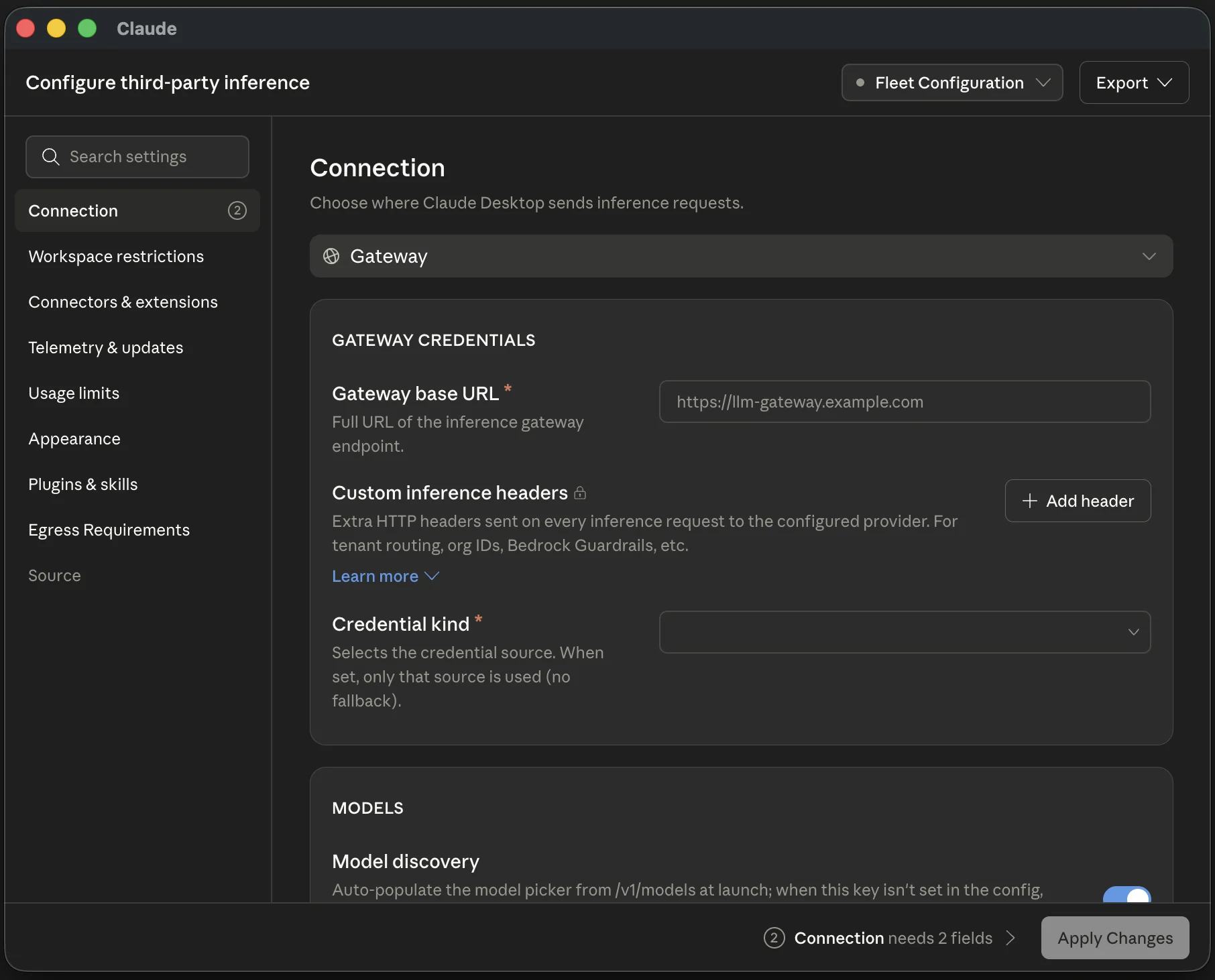
- Choose Developer → Configure Third-Party Inference… to open the Configure third-party inference window.
- Open the configuration picker in the window's top-right corner (it shows Default until you rename it), choose Import configuration…, and select the file.
- Check the Connection section: it should show Gateway with the base URL from the file. Select Test connection to confirm the key works and discovery finds your models.
- Select Apply Changes and confirm the relaunch.
- On the sign-in screen, choose the gateway option (Continue with Gateway) instead of signing in to Claude.ai.
- Pick a model from the model picker.
baseUrlis the/root with noanthropic /after it. Claude Desktop appendsv1 /itself.v1/ messages "kind": "static"hands Claude Desktop your key as a static API key, which it sends as a bearer token.discoveryEnabledmakes Claude Desktop ask Actualyze at launch which models your key can call, so the profile names no models. Don't add a model list to it: a list replaces discovery.prefer1mContextapplies to models Actualyze lists with a context window of 1,000,000 tokens or more. Each such model gets one picker entry that requests the 1M-token window, in place of a standard entry plus a 1M context window entry. In the window it is the Use 1M wherever it's available toggle under Models.
Warning
The profile holds your API key in plain text. Keep it out of version control and out of shared or synced folders.
Option 2: enter the settings by hand
- Choose Developer → Configure Third-Party Inference….
- In the Connection section, pick Gateway from the provider list ("Connect to your own gateway").
- In the Gateway credentials card, enter
https://as the Gateway base URL. Set Credential kind to Static API key, paste your Actualyze API key as the Gateway API key, and leave Gateway auth scheme on Bearer, the default. Leave Custom inference headers empty.app.actualyze.ai/ anthropic - In the Models card, check that Model discovery is on and leave Model list empty.
- Select Test connection. A working setup reports how many models discovery found and a short test completion.
- Select Apply Changes and confirm the relaunch.
- On the sign-in screen, choose the gateway option (Continue with Gateway) instead of signing in to Claude.ai.
- Pick a model from the model picker.
The window keeps each configuration as a file under ~/ on macOS, %LOCALAPPDATA%\Claude-3p\configLibrary\ on Windows and ~/ on Linux, so the key never appears in an environment variable.
Choose a model
Discovery fills the picker with the models your key can call. A model your team gains access to later appears the next time Claude Desktop launches, without changing the profile.
Claude Desktop offers only models whose ID names a Claude model. An ID passes when it contains claude, anthropic or a Claude tier name (opus, sonnet, haiku, fable or mythos), in any letter case, and no other vendor's model name, such as gpt, gemini, llama or codex. The check covers discovered models and models you list by hand alike, so a model that fails it can't be used from Claude Desktop. For a Virtual Model, a slug such as claude-team-default passes and team-default doesn't, even when every model behind it is a Claude model.
To limit the picker to particular models, list them instead of using discovery: models.list entries with a name (the ID exactly as Actualyze lists it) and an optional labelOverride (the name the picker shows), or Add model under Model list in the window, with Model ID and Display name. A list replaces discovery, so the picker shows only those entries, and the first entry is the default model.
Troubleshooting
402: a spend limit stopped the request before any model ran, so nothing was charged. The message says which limit: usually the key's budget, or the key's own monthly limit.401: the key was rejected. It may be mistyped, revoked or expired, lack the inference scope, or belong to someone who is no longer on the key's team.403: the request was refused. If the message says read-write permission is required, the key is read-only; create a read-write key. Otherwise your team can't use the model you asked for; check its access in the Model Catalog or pick another.402sayingBudget required: the key's budget was deleted, archived or retired, or you no longer have access to it. Create a new key bound to a budget you can use.- Every request fails right after setup: check the base URL. It must end in
/with nothing after it.anthropic - No gateway option on the sign-in screen: Claude Desktop reads the configuration only at launch. Check that Apply Changes went through (the applied configuration is marked in the picker), then quit Claude Desktop fully and reopen it.
- Test connection fails before you apply: check the base URL first. It must be the
/root; a URL ending inanthropic /makes Claude Desktop requestv1 /.v1/ v1/ models - A model is missing from the picker: either its ID fails the Claude-model check under Choose a model, or your key can't call it. Listing a failing ID by hand doesn't help: Claude Desktop treats it as not an Anthropic model and leaves it out.
- Model not found: the ID you named isn't callable in your workspace. Discovery only offers callable models, so check the IDs in your model list.
503saying the model can't serve Anthropic (Claude Code) requests: that model has no route that speaks the Anthropic protocol. The message names Claude Code but applies to Claude Desktop too. Pick a model that does.400saying an Actualyze guardrail changed the request before dispatch: a guardrail changed an earlier turn, so the conversation history no longer lines up. Start a new conversation.422naming a tool: a guardrail's tool policy blocks that tool, so the request stops instead of running it.
Reference
| Setting | Value |
|---|---|
| Inference provider | Gateway |
| Base URL | https:// |
| Credential kind | Static API key |
| Gateway auth scheme | Bearer |
models.discoveryEnabled | true |
| Profile file name (in-app) | actualyze-claude-desktop.json |
Requests you cancel mid-stream still draw down the usage they consumed.
For the profile schema and the rest of Claude Desktop's gateway settings, see Anthropic's Claude Desktop gateway documentation.